
Accessibility Widget for Shopify
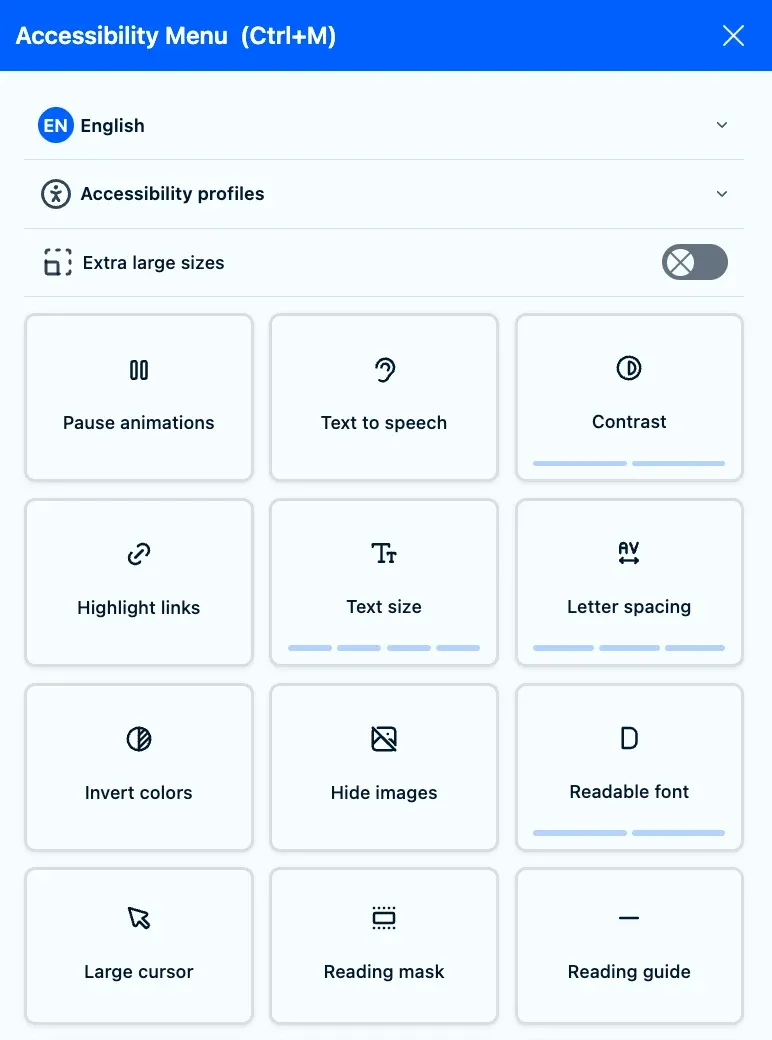
Give every visitor a way to adapt your store to their needs. The Pandectes accessibility widget adds a menu of 17 tools and 4 ready-made profiles, from larger text and higher contrast to paused animations and text to speech, styled to match your theme.
Independently audited. The Pandectes accessibility widget was audited by an external testing company against WCAG 2.2 Level AA, Section 508 and EN 301 549. The audit covers the widget's own interface. See the audit details.
How it works
Turn on the app embed
In your Shopify theme editor, open App embeds and switch on Pandectes Core. The same embed runs the consent banner.
Make it yours
Pick the icon, colors, font and position, choose which tools and profiles visitors see, and link your accessibility statement.
Enable it
Start with Enable for admins to preview it on your live store, then switch it on for every visitor.
17 tools your visitors control
Pause animations
Stops motion and moving content.
Text to speech
Reads out what the visitor selects.
Contrast
Raises contrast in two steps.
Highlight links
Makes every link stand out.
Text size
Enlarges text in four steps.
Letter spacing
Opens up the space between letters.
Invert colors
Reverses the page colors.
Hide images
Removes images for a distraction-free read.
Readable font
Switches to a font designed for legibility.
Large cursor
A bigger, easier-to-track pointer.
Reading mask
Dims everything but the line being read.
Reading guide
A bar that follows the pointer line by line.
Tooltips
Shows descriptions as visitors hover.
Page structure
An outline of the page to jump around it.
Line height
Adds space between lines of text.
Text alignment
Changes how text lines up.
Saturation
Lowers or removes color saturation.
Accessibility profiles
Presets that apply several adjustments at once, for the needs visitors mention most.
ADHD
One click sets up the page for visitors with ADHD.
Dyslexia
One click sets up the page for visitors with dyslexia.
Visually impaired
One click sets up the page for visitors with low vision.
Seizure-sensitive
One click sets up the page for visitors sensitive to motion and flashing.
Built to fit your store
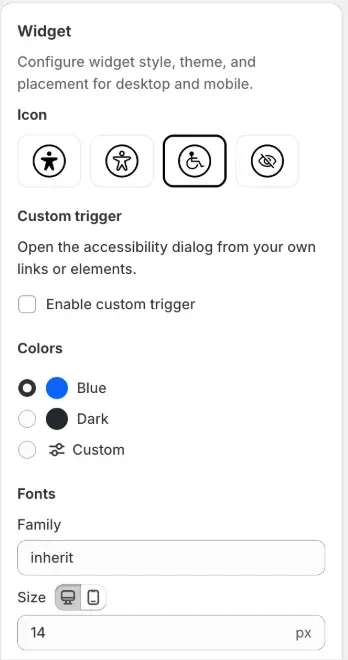
Match your theme on desktop and mobile
- Four widget icons, and a custom trigger to open it from your own link or button
- Blue, dark or custom colors, with the font family and size of your theme
- Icon size, corner and distance from the edges
- Show it on desktop and mobile, or on one of them only
- On Enterprise: separate desktop and mobile settings, and custom CSS for a fully branded look
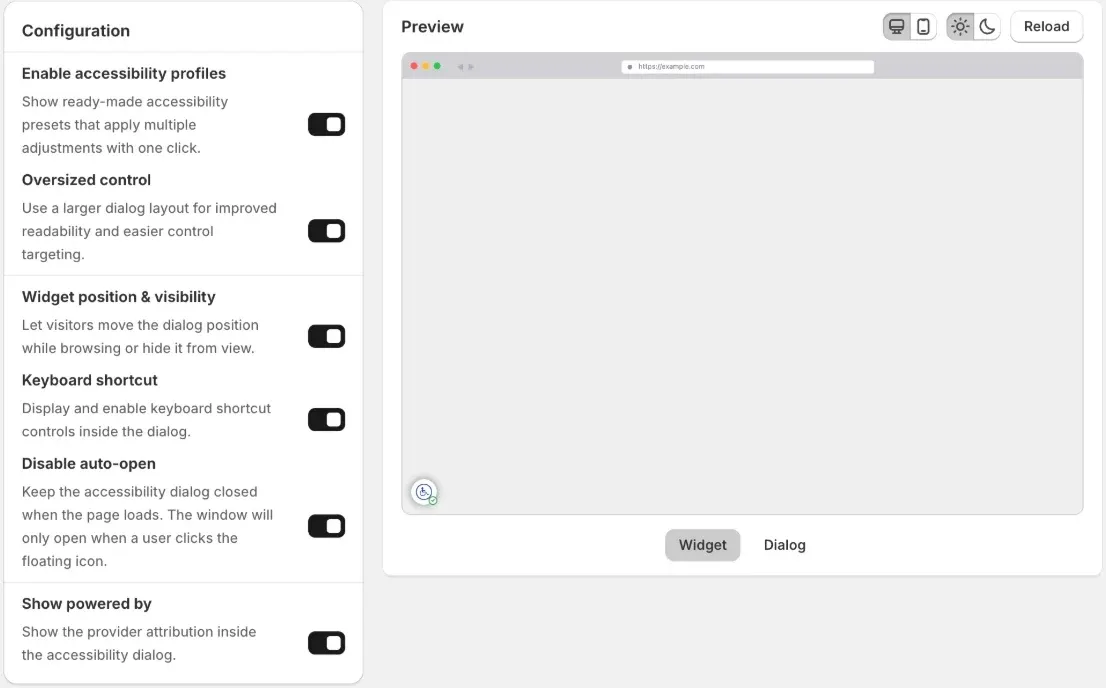
Decide how the menu behaves
- Accessibility profiles that apply several adjustments with one click
- An oversized layout with larger controls that are easier to target
- Visitors can move the menu to the other side or hide it while they browse
- A keyboard shortcut, Ctrl + M, to open the menu without a mouse
- Stays closed until a visitor opens it, if you prefer
- Optional "Powered by" attribution
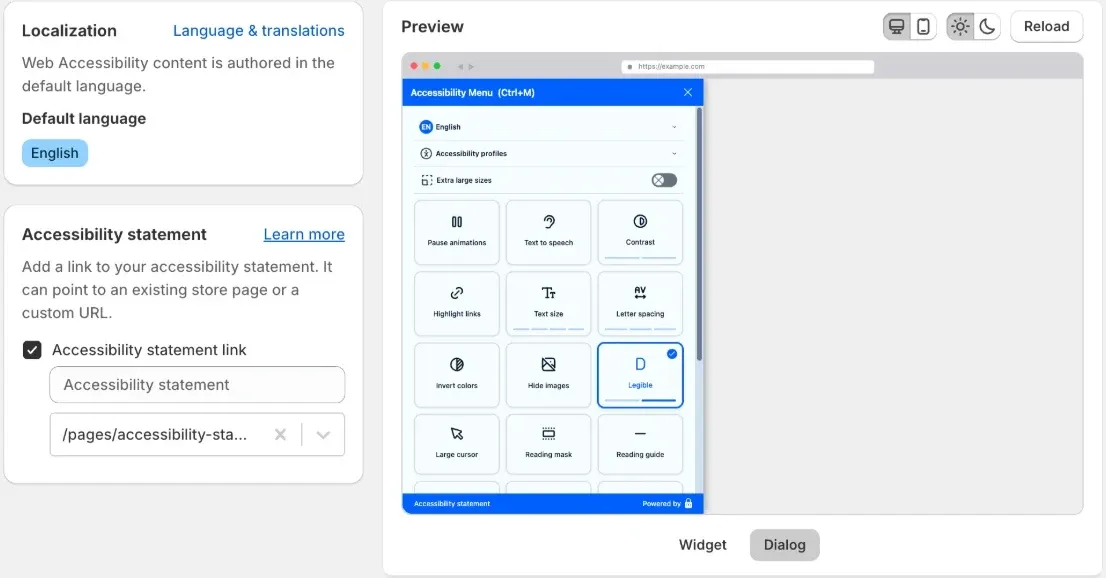
Your statement, in your visitors' language
- Link your accessibility statement from the menu, to a store page or any URL
- The menu follows your store languages, with a language switcher for visitors
- Text to speech reads in the language the visitor picks
Show it where accessibility laws apply
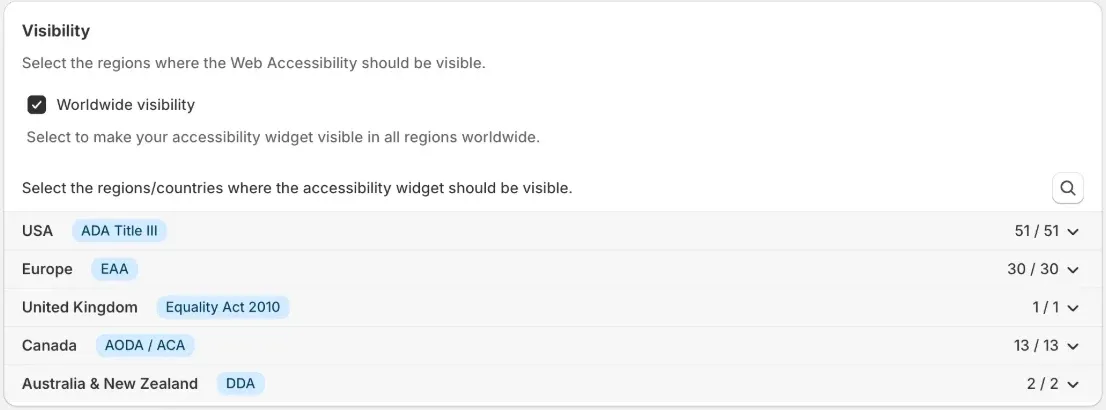
- Show it worldwide, or only in the regions you choose
- USA (ADA Title III), Europe (European Accessibility Act) and the UK (Equality Act 2010)
- Canada (AODA and ACA), Australia and New Zealand (Disability Discrimination Acts)
- Narrow any region down to single states or countries
Frequently asked questions
Does the accessibility widget make my store compliant with the ADA or the European Accessibility Act?
No widget can do that on its own, and you should be wary of any that claims to. The widget gives visitors tools to adapt your pages to their needs. Compliance with laws such as the ADA or the European Accessibility Act also depends on your theme, content and checkout meeting the WCAG guidelines, for example alt text on images, enough color contrast and full keyboard navigation. Use the widget alongside that work, and publish an accessibility statement that explains what you support and how visitors can reach you.
Which plan includes the accessibility widget?
The widget is available on the Premium and Enterprise plans, and every paid plan starts with a 7-day free trial. Enterprise adds separate desktop and mobile options and custom styling. Compare the plans.
How do I add the widget to my Shopify store?
Switch on the Pandectes Core app embed in your theme editor, then open Web Accessibility in the app and set it to Enable. Choose Enable for admins first to preview it on your live store before visitors see it. The setup guide walks through every setting.
How does text to speech work?
Visitors click an element and the widget reads a short description of it aloud, highlighting it as it speaks, in the language selected in the menu. It uses the browser's built-in speech, so nothing needs installing. It helps visitors who prefer to listen, but it is not a replacement for dedicated screen readers such as NVDA, JAWS or VoiceOver. How the screen reader works.
Can visitors open the menu from the keyboard?
Yes. Ctrl + M opens and closes the accessibility menu, and the shortcut is shown inside it.
Can I show the widget only in some countries?
Yes. Show it worldwide, or pick regions such as the USA, Europe, the UK, Canada, and Australia and New Zealand, down to single states or countries.
What should my accessibility statement include?
Your commitment to accessibility, the standard you work towards (usually WCAG Level AA), any known limitations, a way for visitors to report problems, and the date you last reviewed it. How to write an accessibility statement.
Why Choose Pandectes GDPR Compliance?
Most popular
Shopify's most popular and widely used GDPR app on the app store with thousands of happy stores and hundreds of positive reviews.
Flexible & Modular
From small to large stores with millions of visitors per day Pandectes solution can serve visitors without any affect on stores performance.
Regulations Coverage
Pandectes GDPR Compliance covers the most popular data privacy laws and regulations around the world including GDPR, CCPA, VCDPA, LGPD, PIPEDA, PDPA & APPI
Banner Modes
Pandectes GDPR Compliance app provides different banner modes depending your needs.
Cookie Dictionary
Cookie dictionary maintains a global cookie database. Each cookie is compared with the database for auto-categorization and information.
Consent Records
Provides an audit trail of detailed consent records, easily downloadable to demonstrate compliance.
Multilingual
Pandectes GDPR Compliance app supports more than 130 languages. It also offers Google Translate integration.
Insights & Reports
Consent tracking, customer data requests, scan results are the main reports and insights to monitor your compliance in the best way.
24/7 Support
Our team of experts are always available to give you the best support with 24/7 coverage over chat and email.
Make your Shopify Store's use of cookies and online tracking compliant today
Try for freeRecent Posts

GDPR and Bot Traffic: A Guide for Website Owners
Bot detection processes visitor data, so GDPR applies. How to choose a lawful basis, handle bot-detection cookies and consent, and document it for your Shopify store.

Shopify GDPR Compliance: The Complete 2026 Guide
Is your Shopify store GDPR compliant? What Shopify covers, what you must do yourself, an 8-step checklist with admin paths, fines, and the 2026 changes.
How to Handle GDPR Data Requests on Shopify, Step by Step
How to answer GDPR data requests (DSARs) on Shopify: verify the customer, export or erase their data in Shopify admin, cover your apps, and meet the one-month deadline.