
 Install free
An email from Google Ads saying your site is under review for the EU User Consent Policy is easy to file away as legal housekeeping. It shouldn’t be. If the issues it lists aren’t fixed, Google can switch off ad personalisation, remarketing and conversion measurement for traffic from Europe, and your campaigns lose the signals Smart Bidding runs on.
This guide is for both sides of the account: the merchant whose store is audited, and the agency that manages the ads. It covers what Google checks, how to fix each issue on Shopify, why Consent Mode can look fine and still fail, and how to ask Google for a re-audit.
Key takeaways
- Google audits sites and apps that use its advertising services and have visitors in the EEA, the UK or Switzerland. It has run these audits since 2015.
- An audit names one or more of eight issues, from a missing banner to cookies set before consent.
- If a partner doesn’t engage, Google can suspend ad personalisation, remarketing and conversion measurement for the affected account.
- The most common failures are technical, not legal: tags that fire before consent, and Consent Mode signals that are missing or out of order.
- After fixing the issues, you notify Google through its EU user consent policy contact form to request a re-audit.
What Google is checking, and why it matters now
The EU User Consent Policy requires any site that uses Google’s advertising products with visitors in the EEA, the UK or Switzerland to get valid consent for cookies and for the use of personal data for ads, and to tell visitors that data is shared with Google.
Google checks this with audits. According to Google’s own guidance, reviewers visit the site as a normal visitor would, record the issues they find, and contact the account. Google gives a “reasonable timeframe” to fix them. If the partner doesn’t respond or show a good-faith effort, Google may act on the account: for advertisers, that can mean suspending audience features such as ad personalisation and remarketing, and conversion measurement.
For a store that relies on Google Ads, that is not a small penalty. Without conversion data from Europe, Smart Bidding strategies such as Target ROAS and Target CPA lose the signal they learn from. Without personalisation, remarketing lists stop filling. Performance drops in a way that looks like a market or creative problem until someone opens the policy email.
The 8 issues Google flags, and how to fix each one
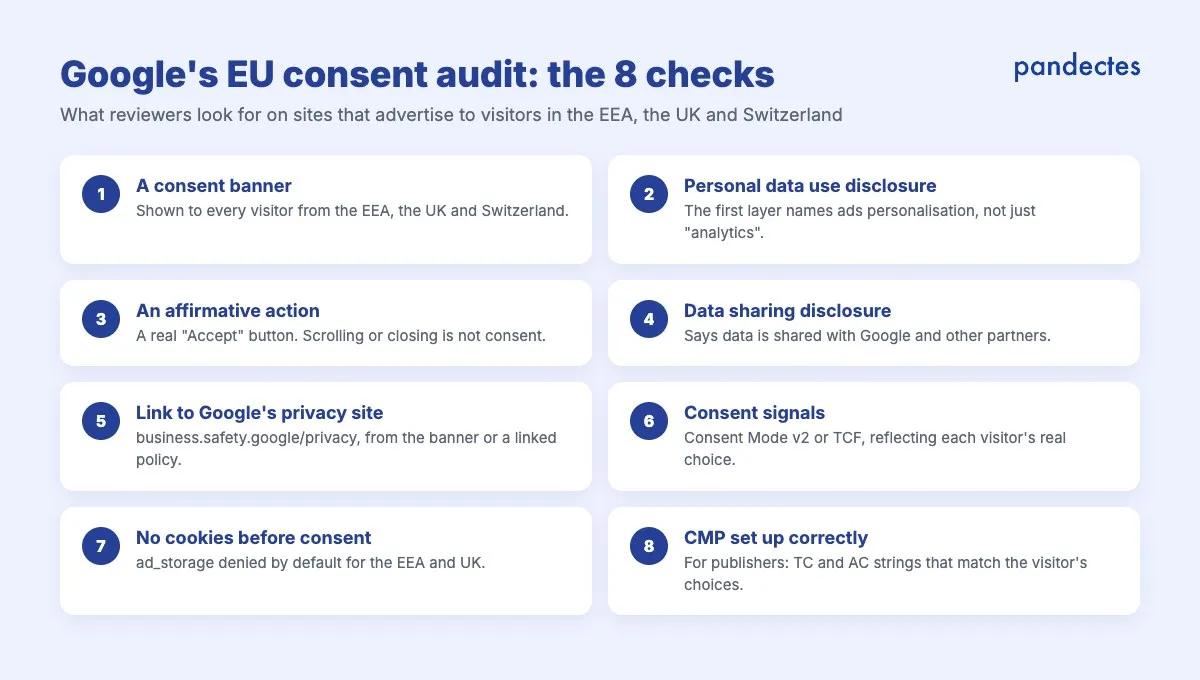
Google lists eight issues an audit can name. Here is each one in plain words, with what it means for a Shopify store.
1. Missing consent mechanism or banner
Visitors from every EEA country, the UK and Switzerland must see a consent banner. Google recommends a Google-certified CMP, and advertisers must pass consent signals for EEA traffic through Consent Mode or the IAB TCF.
On Shopify: turn the banner on for these regions with geolocation, so European visitors get an opt-in banner and others get the notice their own law requires.
2. Missing or incomplete personal data use disclosure
The first layer of the banner, the part visitors see before clicking anything, must say that cookies and personal data are used for personalised advertising. Google asks for a specific reference to “ads personalization”. A banner that only mentions “analytics” or “improving your experience” fails this check.
On Shopify: check your banner’s main message and make sure it names advertising and personalisation in plain words, in every language you show.
3. User affirmative action not set up correctly
Visitors must actively agree, with a button such as “Accept” or “I agree”. Scrolling, continuing to browse or closing the banner is not consent under this policy.
On Shopify: use an Accept and Decline banner for European visitors, and keep implied consent switched off for those regions.
4. Missing or incomplete data sharing disclosure
Visitors must be told which third parties, including Google, can access their data. This can be in the banner or in the cookie or privacy policy it links to.
On Shopify: list Google and your other advertising partners in your cookie policy, and link that policy from the banner. A cookie policy generator builds the list from the cookies your store actually sets.
5. Missing link to Google’s Business Data Responsibility site
The banner must link to Google’s Business Data Responsibility site, either directly or through a policy page the banner links to. If you already have a Google link, check that it points to business.safety.google/privacy/.
On Shopify: in Pandectes, add the Google partners page link in the banner’s links, and it appears beside your privacy and cookie policy links.
6. Consent signal not set up correctly
For EEA visitors, Google must receive consent signals that reflect each visitor’s real choice, through the latest version of Consent Mode or the IAB TCF. This is where most audits fail, and it is covered in detail in the next section.
7. Cookies set before consent
No advertising or analytics cookie may be set before the visitor agrees. With Advanced Consent Mode, the default state must be set through your CMP, with ad_storage denied for the EEA and UK until the visitor accepts.
On Shopify: hard-coded pixels and apps that load their own scripts are the usual culprits. Auto-blocking holds non-essential scripts back until consent, and a free store scan shows which cookies are set before anyone clicks.
8. Consent Management Platform not set up correctly
This one mainly concerns publishers that show ads on their own site: a Google-certified CMP must generate TC and AC strings that match each visitor’s choices, with granular choices for IAB purposes. Most Shopify stores advertise rather than publish, so this issue rarely applies to them.
“Consent Mode is set up, but Google says it isn’t”
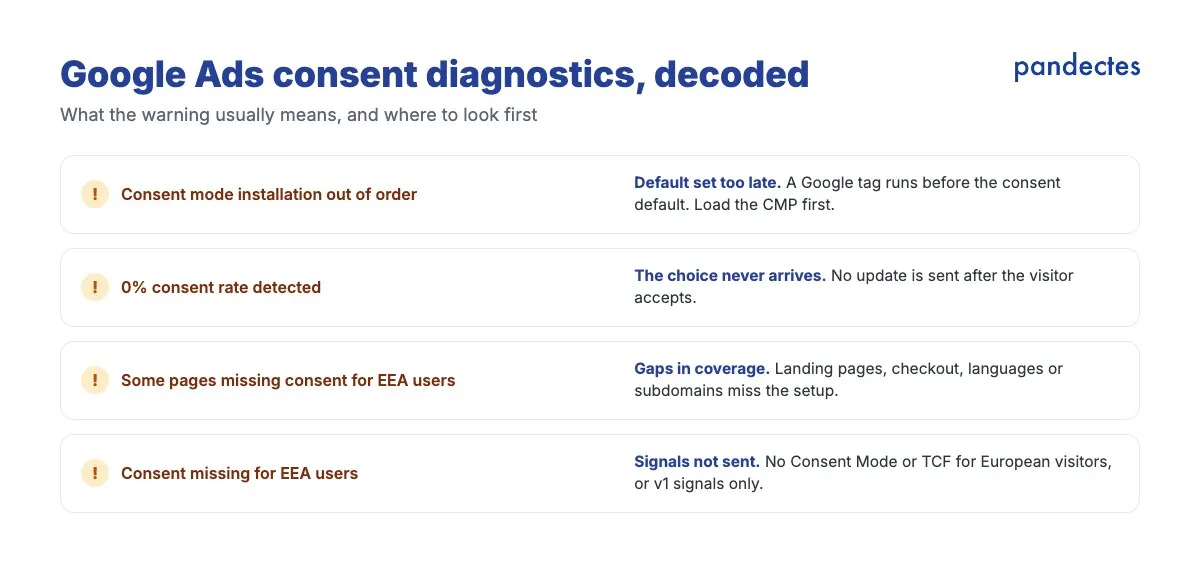
A banner that looks right and tags that fire in Tag Manager’s preview are not proof that Google receives the right signals. Google Ads reports problems under Goals > Conversions > Diagnostics and in each conversion action’s diagnostics. Messages to watch for include:
- “Consent mode installation out of order”
- “Some pages missing consent for EEA users”
- “Verify consent mode setup as 0% consent rate detected”
- “0% consent rate detected in some regions”
The usual causes:
- The default arrives too late. The consent default must be set before any Google tag runs. If a tag fires first, Google reports the installation as out of order.
- The choice never reaches Google. A default of “denied” with no update after the visitor accepts produces a 0% consent rate.
- Only “Accept all” is wired up. Declining, choosing some categories and withdrawing consent must also send an update.
- Signals are missing. Consent Mode v2 needs
ad_user_dataandad_personalizationas well asad_storageandanalytics_storage. An old v1 setup on part of the site fails. - Not every page is covered. Landing pages, checkout, other languages and subdomains must all carry the same setup.
How to check your own store: load it in a private window from a European location, open the browser’s network panel and filter for Google requests, and look at what is sent before and after you accept and decline. Our free Google Consent Mode checker does the first pass for you. After a fix, Google Ads can take a few days to update its diagnostics.
A Google-Approved Consent Platform for Shopify
Pandectes is an official Google Certified Consent Management Platform and is fully compatible with Google Consent Mode v2 and global privacy regulations.
View the App on ShopifyWhat agencies need to do
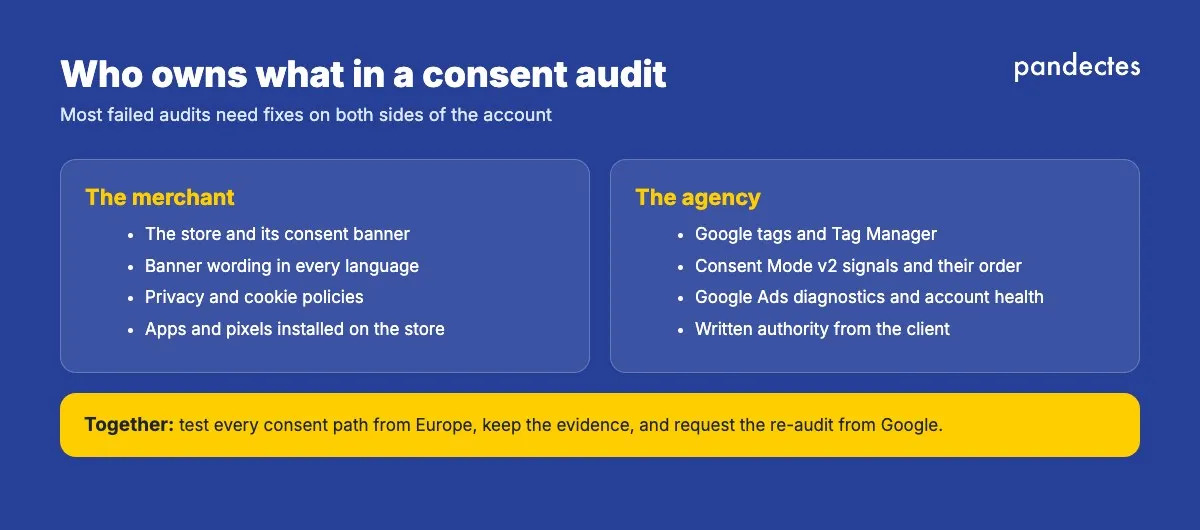
When an agency runs a client’s Google Ads, the audit lands in an account the agency manages, but the store it audits belongs to the client. That split is where problems fall through the cracks.
- Make consent part of onboarding. Before launching campaigns for a client with European traffic, check the eight issues above. It takes minutes and prevents a suspended account later.
- Agree who owns what. The merchant usually owns the store, the banner and the policies; the agency usually owns the tags, Consent Mode and the account. Write it down, because a Google audit needs fixes on both sides.
- Read the right contract. Under the Google Ads Data Processing Terms, Google acts as a processor only for certain services, such as Customer Match and Enhanced Conversions, while most Google Ads activity is under controller terms. An agency that is itself the Google customer on behalf of clients needs written authority from each client to give Google those instructions.
- Treat unexplained EEA drops as a possible consent issue. A sudden fall in European conversions or remarketing audiences is worth checking against policy notices and Consent Mode diagnostics before blaming bids or creative.
- Keep evidence. Screenshots of the banner, a recording of each consent path, and the diagnostics before and after a fix make the re-audit request much faster.
Agencies that install Pandectes for many clients can join our agency program for priority support and early access to new features.
How to respond to an audit
- Read the notice carefully. It names the site and the issues found. Fix each one; a GTM change alone won’t fix wording or a missing link.
- Test every path from a European location: first visit, accept, decline, granular choice, withdrawal and return visit.
- Wait for the live site to update. Publish your changes and confirm the live version, not a draft or a workspace.
- Ask for a re-audit. Notify Google through the EU user consent policy contact form so its policy team can review the site again.
How Pandectes helps you pass
Pandectes is a Google-certified CMP and IAB TCF certified, built for Shopify. Out of the box it:
- Shows an opt-in banner to visitors in the EEA, the UK and Switzerland with geolocation, with Accept and Decline buttons.
- Sends Google Consent Mode v2 signals, all four of them, set before Google tags run and updated on every choice.
- Holds back non-essential scripts until consent with auto-blocking.
- Lets you link your privacy policy, cookie policy and Google’s Business Data Responsibility page from the banner, in every language you sell in.
- Records every consent, so you can show what each visitor agreed to.
This article explains Google’s published policy and common practice, not legal advice.
Make Your Shopify Store GDPR & Cookie Compliant in Minutes
Start Free on ShopifyFrequently asked questions
What is the Google EU User Consent Policy?
It is Google’s policy for sites and apps that use its advertising services with visitors in the EEA, the UK or Switzerland. It requires valid consent for cookies and for using personal data for ads, and disclosure that data is shared with Google.
What happens if I fail a Google consent audit?
Google first contacts the account and gives a reasonable timeframe to fix the issues. If there is no response or good-faith effort, Google may suspend ad personalisation, remarketing and conversion measurement for advertisers on the affected account.
What does Google check in an EU User Consent Policy audit?
Eight issues: a missing banner, a missing personal data use disclosure, no affirmative action, a missing data sharing disclosure, a missing link to Google’s Business Data Responsibility site, consent signals not set up correctly, cookies set before consent, and a CMP not set up correctly.
Why does Google Ads say “consent mode installation out of order”?
Usually because a Google tag runs before the consent default is set. The default must be in place before any Google tag fires, which a CMP that loads first and sets Consent Mode immediately handles for you.
How do I request a re-audit from Google?
Fix the issues, publish the changes, then notify Google through the EU user consent policy contact form in Google Ads support so the policy team can review the site again.
Do agencies need to worry about Google consent audits?
Yes. The audit lands in the ad account the agency manages, and fixes are usually needed on both the store and the tags. Agencies should check consent when onboarding a client and agree who owns the banner, the tags and the response to Google.
Does a Shopify store need a Google-certified CMP?
Google recommends one for advertisers and requires one for publishers. Pandectes is a Google-certified CMP and sends Consent Mode v2 signals out of the box.