

 Install free
For years, this website ran on WordPress. It did its job, but it also did what WordPress sites tend to do over time: it grew a plugin for everything. One to write SEO tags. One to stop attacks. One to build pages. One to translate them. One to speed up images. One to inject snippets of code here and there. By the end we were running around 25 plugins, each one needing its own updates, its own reconfiguring, and its own troubleshooting when something else on the site broke and it wasn’t obvious which plugin was responsible.
Earlier this year we rebuilt the whole site on Astro and moved it off WordPress hosting entirely. This is the case study: why, exactly how, and what it let us stop paying for.
The short version
- What we did: rebuilt about 390 blog posts and more than 100 pages as a static Astro site, then retired WordPress and its hosting completely.
- What we noticed first, using it: pages that used to visibly load in stages just appear now, already whole. That’s the thing nobody warns you WordPress costs you.
- How we approached it: exported everything first, measured the real site instead of guessing at it, built one automated pipeline for repeatable content, and verified every address before switching over.
- How much faster it is: in Google’s real-visitor data, desktop pages show their main content 46% sooner and the server responds 61% faster.
- What happened in Google: clicks held steady through the switch and our average position improved by more than two places.
- How long it took: about a month, start to cutover.
- What we cut: ten paid plugins and services, listed tool by tool below.
- What it’s worth: roughly $3,000 to $4,500 a year in subscriptions alone, before counting maintenance time.
Why we actually moved
The reason that mattered most day to day wasn’t a spec sheet, it was using the site: pages that used to visibly load in pieces on WordPress just appear now, already complete. Everything else was real but secondary: the 25 plugins meant a steady drip of updates and small breakages nobody had time for, and the renewal invoices for a firewall, a page builder, a translation tool and the rest added up to real money every year. A static site sidesteps most of it by construction: there’s no database or admin panel to defend because there’s no server-side application left, and no per-request rebuild because every page is generated once, ahead of time.
WordPress vs. Astro: what actually changed for us
| WordPress (before) | Astro (after) | |
|---|---|---|
| Where content lives | A database, edited through an admin dashboard | Version-controlled files, edited through a reviewed change |
| How pages are built | A page-builder plugin, page by page | A small library of reusable components |
| What’s exposed to attackers | A login page, an admin panel, a database | No server-side application left to attack |
| Multiple languages | A dedicated plugin | Built into the same content pipeline |
| Custom code and scripts | Pasted into a snippets plugin | Reviewed and shipped like any other change |
| Hosting | Specialized WordPress hosting, priced for the risk | The same global network that serves ordinary static traffic |
How much faster is it? Measured by real visitors
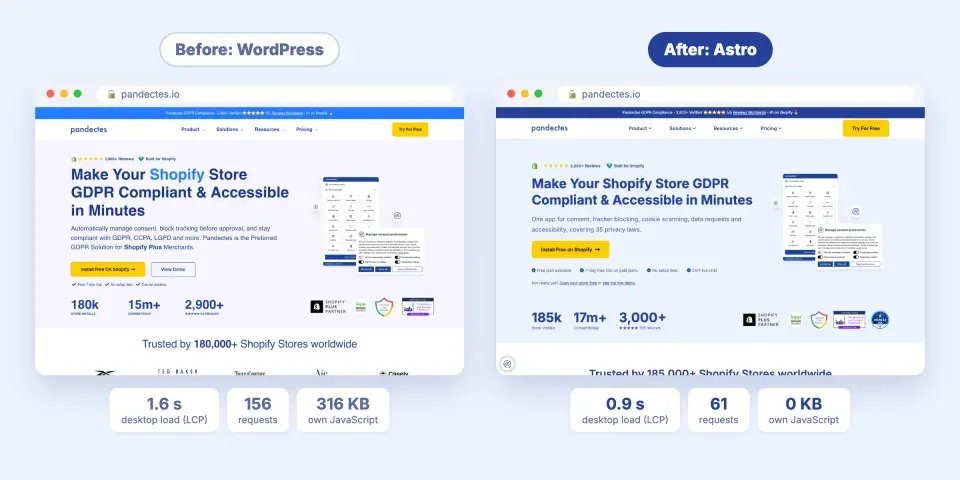
The first thing we noticed was speed, so we checked it against Google’s own data. The Chrome UX Report records how fast pages load for real Chrome users visiting a site, not a lab test. These figures are the 75th percentile: three out of four visits were at least this fast.
| Real-visitor measure | WordPress | Astro | Change |
|---|---|---|---|
| Desktop: main content visible (LCP) | 1,631 ms | 873 ms | −46% |
| Desktop: server response (TTFB) | 1,120 ms | 433 ms | −61% |
| Phone: main content visible (LCP) | 1,099 ms | 1,002 ms | −9% |
| Phone: response to a tap or click (INP) | 152 ms | 113 ms | −26% |
| Layout shift while loading (CLS) | 0.02 to 0.04 | 0.00 | none at all |
The biggest gain is on desktop, where the main content now appears in under a second, and the page no longer shifts as it loads. Phones gain less because our pages were already quick there, but taps respond about a quarter faster.
Behind those numbers is a much lighter page. We loaded our homepage on both versions of the site in the same browser and counted what it downloads:
| Our homepage | WordPress | Astro |
|---|---|---|
| The site’s own JavaScript (theme, page builder, plugins) | 316 KB | 0 KB |
| Stylesheets | 155 KB | 14 KB |
| HTML | 95 KB | 39 KB |
| Elements on the page | 2,557 | 1,077 |
| Requests to load the page fully | 156 | 61 |
Almost everything the Astro page still downloads is third-party: our analytics and advertising tags and our own consent banner, the same ones the WordPress site loaded.
Did we lose Google traffic?
No. This is the question everyone asks about a migration, so we compared four weeks of Google Search Console data either side of the switch:
- Clicks from Google held steady, within 2% of the four weeks before.
- Our average position improved by more than two places.
- The share of searchers who clicked more than doubled.
A 2% difference sits inside normal week-to-week variation, and those weeks also saw Google roll out a spam update across the whole web. Impressions did fall, and that was expected: old archive and category pages we chose not to bring over stopped showing up for broad searches that almost never led to a visit. Meanwhile, no address that brought visitors broke, because every one of them was either still there or redirected, and pages we added after the switch were already bringing in new visits within weeks.
How long it took
Start to cutover, about a month. Roughly, by week: (1) inventory and decide what earns a place, (2) measure the real design and build the pipeline, (3) rebuild the design system and compare every page against the old one, (4) verify every address, freeze, cut over, and simplify publishing.
Your own timeline depends on how big your site is and how many people can work on it at once, but a month is a reasonable planning number for a site this size.
Our migration, step by step
-
Take a full inventory, from the source. We exported every post, page and content type straight from WordPress and read the export itself, not our memory of it, plugins and third-party services included, a few of which nobody could fully explain anymore.

-
Decide what earns its place. We went through that list and wrote down, explicitly, what was worth carrying forward: pages nobody had touched in years didn’t make it, and neither did any plugin solving a problem the new site simply wouldn’t have.
-
Measure the real site before rebuilding it. Instead of guessing at the brand’s colors and spacing, we measured what the live pages actually rendered and reduced that to a small set of rules, which is also how we caught text that had been failing contrast for years without anyone noticing.
-
Build one pipeline for everything repeatable. One pipeline turns a fresh export into finished files for every post automatically; a short, explicit list covers the handful of pages that need a person’s judgment instead. That split is the whole reason a future content refresh is a rerun, not a redo.
-
Rebuild the design once, not per page. A handful of layout patterns (a hero, a feature row, a pricing table, a card grid) cover nearly the whole site, so we built each exactly once. Fix one, and every page using it is fixed.
-
Compare every page against the one it replaces. We shot the old and new page side by side for every page type, at three widths, and fixed what genuinely looked wrong, without chasing an exact match to years of small, accidental drift that wasn’t worth preserving.
-
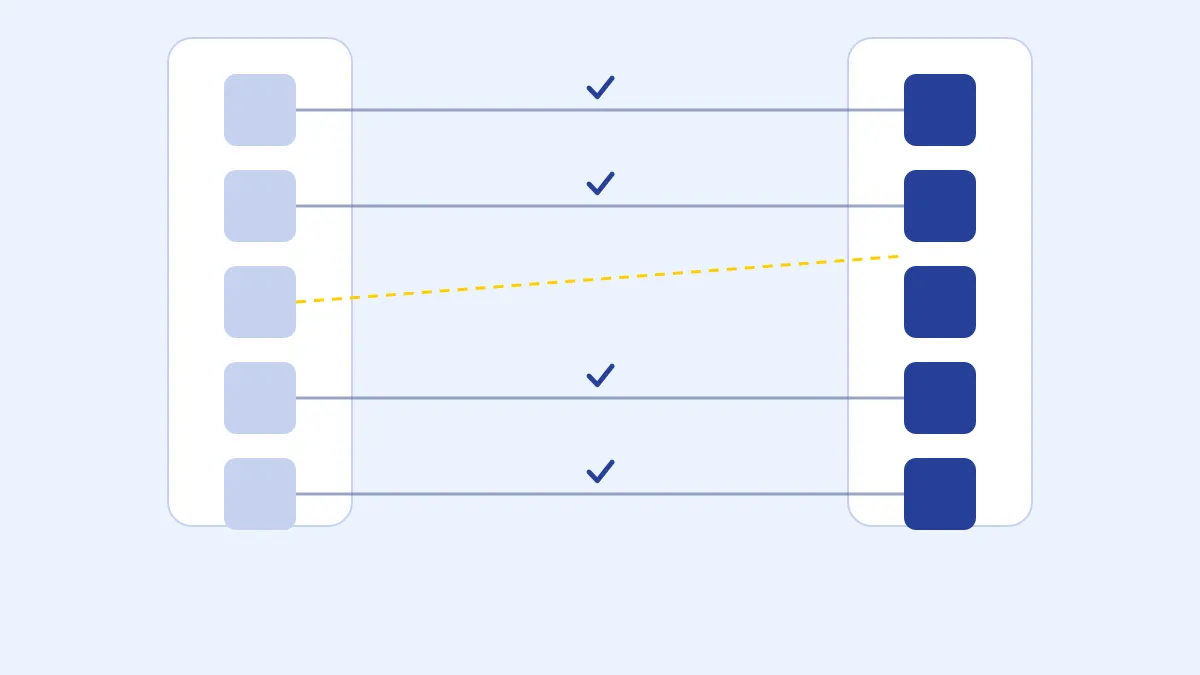
Verify every address before cutting over. Every address on the old sitemap got checked against the new build and a real answer: still there, redirected, or dropped on purpose. Nothing shipped with an unexplained gap.
-
Freeze, refresh once, and cut over. One last export right before launch, one more pipeline run against it, then we stopped touching the old site for good, so the two versions were never both half-true for long.
-
Only then, simplify how the team publishes. Writing moved to propose, automatic check, live preview, publish, with the login, dashboard and page builder gone from day-to-day work. Changed last, once nothing else was still moving, on purpose.
The tools behind the migration
We didn’t buy a plugin to do any of this. Every real problem along the way got a small script built specifically for it:
- Content pipeline. Points at a fresh WordPress export and converts every post and repeatable content type into ready-to-publish files, the same way every time. That repeatability mattered more than the conversion itself: because a run is a rerun and not a rewrite, a content refresh close to launch meant running it again against a newer export, not redoing weeks of work by hand.
- Export comparison. Diffed two full exports of the old site, taken weeks apart, and reported exactly what had changed between them, a new post here, an edited paragraph there. That’s what kept a last-minute refresh a quick review of a short list instead of a re-migration.
- Design measurement. Read every live page’s actual rendered colors, fonts and spacing, pixel by pixel, instead of working from a brand guide or memory. Reducing thousands of those raw readings down to a small, deliberate set of rules became the new site’s design system, and turned up real problems along the way, like body text that had been failing contrast checks for years without anyone noticing.
- Content and structure inventory. Walked the old site page by page and recorded exactly what each one was built from, not just how it looked: every layout, every word, every image, committed before the export was retired for good. That inventory is now the only complete record of what the WordPress site actually contained.
- Visual comparison. Captured the old and new version of every page type side by side, at phone, tablet and desktop widths. That’s what let a person judge whether a page read right quickly, across hundreds of pages, instead of scrutinizing one page for an hour.
- Element-level inspection. For the handful of pages where a screenshot wasn’t precise enough to settle an argument, read the exact computed size, spacing and color of one specific element on the old page and the new one, so a stubborn mismatch got fixed with a real number instead of a guess.
- Address verification. Read the old site’s complete sitemaps and checked every single address against the new build, sorting each one into still there, redirected, or gone on purpose. Nothing shipped until every address had an answer.
Most of these were only ever going to be used once, and that’s fine: something built for exactly one real problem doesn’t have to outlive it.
The tool we kept running afterward
One piece didn’t stop working once the migration itself was finished, because the problem it solves didn’t go away with WordPress: post review runs automatically on every proposed article and checks it against the mistakes a writer is actually likely to make, a missing image, a category that doesn’t exist, an author who isn’t set up yet, leaving a plain-language note instead of a developer-facing error. It’s the reason publishing could move out of a login and a dashboard at all: nobody has to personally review every post for the mechanical stuff.
What we don’t pay for anymore
| We used to run | Why we don’t need it anymore |
|---|---|
| Yoast SEO | Titles, meta descriptions, and structured data are just part of how every page is built. |
| Wordfence | No database, login page, or admin panel left to attack. |
| Elementor Pro | Pages come from one design system instead of being assembled per page. |
| WPML | Multiple languages are part of how the content pipeline works. |
| WPCode | Custom scripts are written once and reviewed like any other change. |
| Imagify | Every image is optimized automatically when the site is built. |
| Code Snippets Pro | Same story as WPCode: custom code lives with the rest of the project. |
| WP Engine | A prebuilt site runs on the same global network as ordinary static traffic, for a fraction of the cost. |
Two more went away because the process around writing changed, not the platform: SurferSEO and Grammarly were both there to catch problems before a post went live. Now every post gets an automatic check and a real preview before anyone signs off anyway, as a normal part of publishing.
Roughly what that adds up to
Every one of those ten tools has a public price tag, and it’s worth doing the math with them. Using each vendor’s typical published price for a plan that would have covered a single company site:
| Tool | Typical published price |
|---|---|
| Yoast SEO Premium | ~$130 |
| Wordfence Premium | ~$150 |
| Elementor Pro | ~$50 to $200 |
| WPML | ~$110 |
| WPCode Pro | ~$100 to $150 |
| Imagify | ~$60 to $120 |
| Code Snippets Pro | ~$80 |
| SurferSEO | ~$600 to $1,200 |
| Grammarly (per writer) | ~$150+ |
| WP Engine hosting | ~$600 to $3,000+ |
Add it up and it lands somewhere around $3,000 to $4,500 a year, before counting the hours someone used to spend updating plugins, clearing false-positive security alerts, or fixing a layout a page builder update broke the week of a launch. Your own mix will land somewhere else, but if you’re carrying a similar stack, it’s a reasonable gut check.
If you’re thinking about doing this too
None of this required a rewrite of what the company does, or treating the old site as sacred. It required an honest inventory, real measurements instead of guesses, and a willingness to rebuild once, properly, instead of patching forever. If a growing list of plugins and renewals sounds familiar, it’s worth the week it takes to find out what’s actually holding your site together.
Start Free with Pandectes
Free plan available. 7-day free trials on all paid features. No setup fees. Cancel anytime.
Start Free on Shopify