
For years, the cookie banner has been treated as a legal chore: something to switch on, make compliant and forget. In 2026 that view is getting expensive. Privacy rules keep tightening, platforms keep limiting tracking, and the brands that do best treat consent as part of the customer experience, not a box to tick.
That idea has a name: privacy-led marketing. It means being open with shoppers about how you use their data, and designing that conversation so well that it builds trust instead of friction. For a Shopify store, it starts with the most visible privacy touchpoint you have: your cookie banner design. If you are still deciding whether your store needs one at all, start with our guide Cookie Banners: Do You Need One?
Key takeaways
- Shoppers are getting warier: 67% of Americans say they understand little or nothing about what companies do with their data, and 75% of consumers won’t buy from a company they don’t trust with it.
- A cookie banner that blocks the page until the visitor chooses can cost a Shopify store sales, because paid traffic lands on product pages.
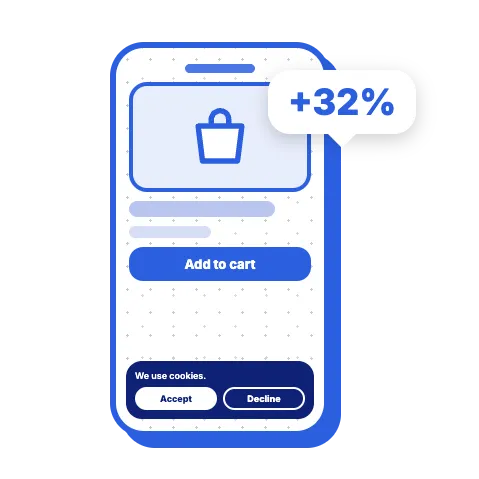
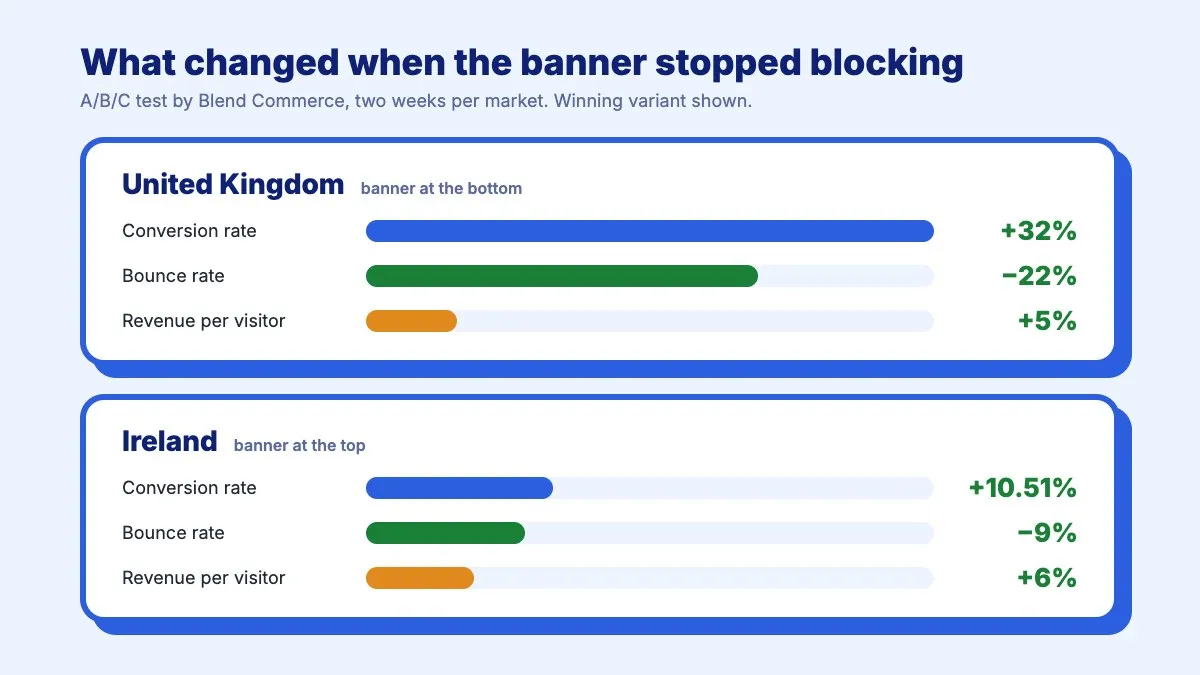
- In an A/B/C test by Blend Commerce, switching to a non-blocking banner lifted conversion rate by 32% in the UK and by 10.51% in Ireland.
- The best banner position was different in each market, so the real win is being able to test your banner.
- A non-blocking banner stays compliant as long as marketing and analytics tags wait for consent and refusing is as easy as accepting.
Why shoppers are saying no more often
The way people respond to consent requests has changed. The years before 2018 were a free-for-all for data: almost anything could be tracked and targeted. Then came the Cambridge Analytica scandal, with up to 87 million Facebook profiles harvested without consent, and two months later the GDPR came into force. Since then, shoppers have learned to read the cookie banner as a question about trust.
Independent research shows where that has left us:
- 67% of Americans say they understand little or nothing about what companies do with their personal data, up from 59% in 2019, and only about 1 in 5 are confident that companies will handle it responsibly (Pew Research Center, 2023).
- 75% of consumers say they won’t buy from organisations they don’t trust with their data, and 2 in 3 reviewed or changed their privacy settings in the past year (Cisco 2024 Consumer Privacy Survey).
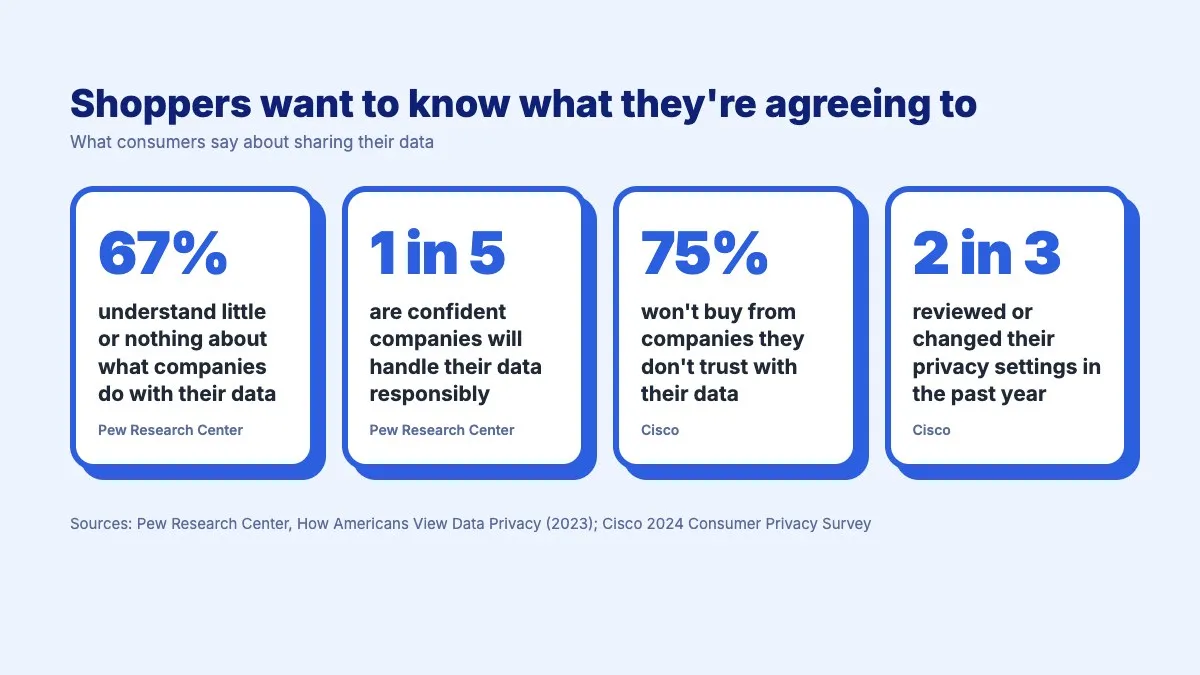
The pattern is clear. Shoppers are not refusing to share data. They are refusing to share it with brands that are vague about why they want it, and they take their custom elsewhere when they don’t trust a store. For a store, that turns the cookie banner from a legal formality into one of the first moments a new visitor decides whether to trust you.
The e-commerce paradox: compliance versus revenue
On a content site, an annoying cookie banner costs you a little attention. On a Shopify store, it can cost you sales.
Think about where your paid traffic lands. A shopper clicks an ad and arrives on a product page, ready to look at the product and its price. If a consent overlay covers the product image or the Add to Cart button, that is not a design detail. It is a revenue problem, and you are paying for every visitor it turns away.
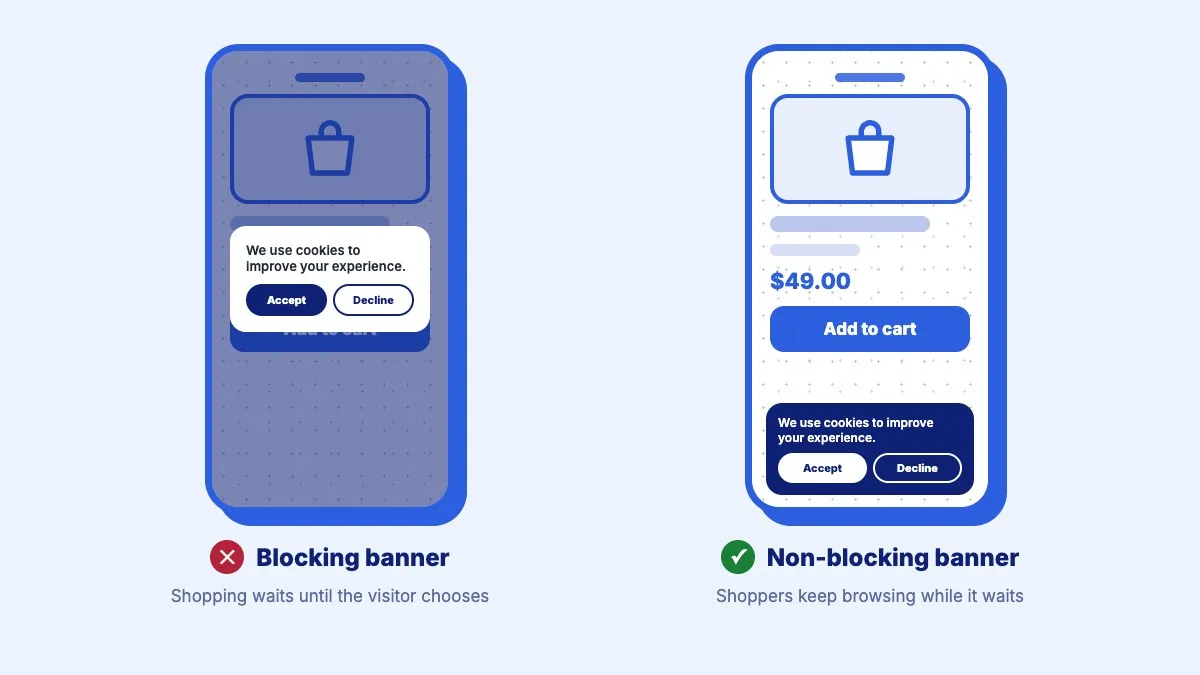
This is the paradox every merchant faces. You need a banner to comply with the GDPR, the ePrivacy rules and a growing list of US state laws. But the way that banner appears on the page can decide whether a visitor shops or bounces.
The proof: a 32% lift from changing how the banner appears
At Google’s CMP Partner Summit in London in June 2026, we presented a case that shows how much is at stake. It comes from Blend Commerce, a Shopify agency, which tested the cookie banner of a sports nutrition brand selling in the UK and Ireland.
In the brand’s original setup, shoppers could not browse the store until they made a choice on the cookie banner. Blend suspected this was causing friction, so it ran an A/B/C test for two weeks in each market. The original blocking banner was tested against two non-blocking versions: one at the top of the page and one at the bottom.
The results:
- UK: the banner at the bottom of the page won, with a 32% increase in conversion rate, a 22% drop in bounce rate and 5% more revenue per visitor.
- Ireland: the banner at the top of the page won, with a 10.51% increase in conversion rate, a 9% drop in bounce rate and 6% more revenue per visitor.
Two lessons stand out. First, letting shoppers keep shopping while the banner waits for their choice made a large difference in both markets. Mobile apps have learned the same lesson with tracking prompts: according to AppsFlyer, 30% of non-gaming apps see higher opt-in rates when they ask after showing users some value, rather than the moment the app opens. Second, the best position was different in each market. There is no universal winning layout. What wins is the ability to test.
There is also a trade-off worth knowing. A banner that blocks the page usually collects more choices, simply because visitors have to respond. Blend noted that the brand could switch back to the blocking design during campaigns where a higher consent rate matters more than conversion. Privacy-led marketing is about making that trade-off deliberately, with data, rather than by default.
Three principles of privacy-led consent
1. Earn the opt-in
Good cookie banner design starts with the shopper. People are more willing to say yes when they understand what they are agreeing to and feel in control. That means a banner that looks like part of your store, speaks the visitor’s language and explains choices in plain words.
Start with the words. Compare a banner that says “This website uses tracking technologies for the purpose of facilitating user experience optimisation” with one that says “We use cookies to show you relevant products and measure our ads. You choose what you share.” The second tells shoppers what they get and that they are in control, and it gives them Accept, Decline and a way to choose by category. Rewriting your banner text is the cheapest change you can test.
With Pandectes, the consent banner takes on your store’s fonts, colours and button styles, so it looks native rather than bolted on. Geolocation shows each visitor the banner their law requires, an opt-in banner under the GDPR or an opt-out link in California, instead of the strictest version for everyone. And the banner is shown in the visitor’s language, which matters for an informed choice.
2. Treat trust as an asset
Every honest interaction with a shopper builds the relationship that leads to better first-party data: the email sign-ups, account creations and repeat purchases that do not depend on third-party tracking.
Trust also means meeting the rules regulators actually check. Under the GDPR, refusing should be as easy as accepting, and regulators such as France’s CNIL have fined companies for hiding the reject option (see our guide to the CNIL’s cookie rules). A non-blocking banner is fine, as long as no marketing or analytics tags run before the visitor agrees. That is what Pandectes auto-blocking does: it holds those tags back until consent is given, so you can remove friction without cutting corners.
3. Keep measuring, even when shoppers decline
Not every visitor will accept, and that is fine. What you cannot afford is to lose sight of your marketing performance when they do.
Google Consent Mode v2 and Microsoft Consent Mode pass each visitor’s choice to your ad platforms, so they adjust what they collect and can model the conversions they cannot observe directly. Pandectes is certified by both Google and Microsoft as a consent management platform, so these signals are sent correctly from the same banner.
 Pandectes GDPR ComplianceThe most popular & reviewed GDPR app for ShopifyInstall free on Shopify
Speed is part of the experience
A banner that slows down your store hurts conversions on its own. Google ranks pages partly on Core Web Vitals, and shoppers leave slow pages.
In Google’s Core Web Vitals Technology Report for June 2025, 73.28% of sites using Pandectes passed all three Core Web Vitals, ahead of the best-known consent platforms (read the full report).
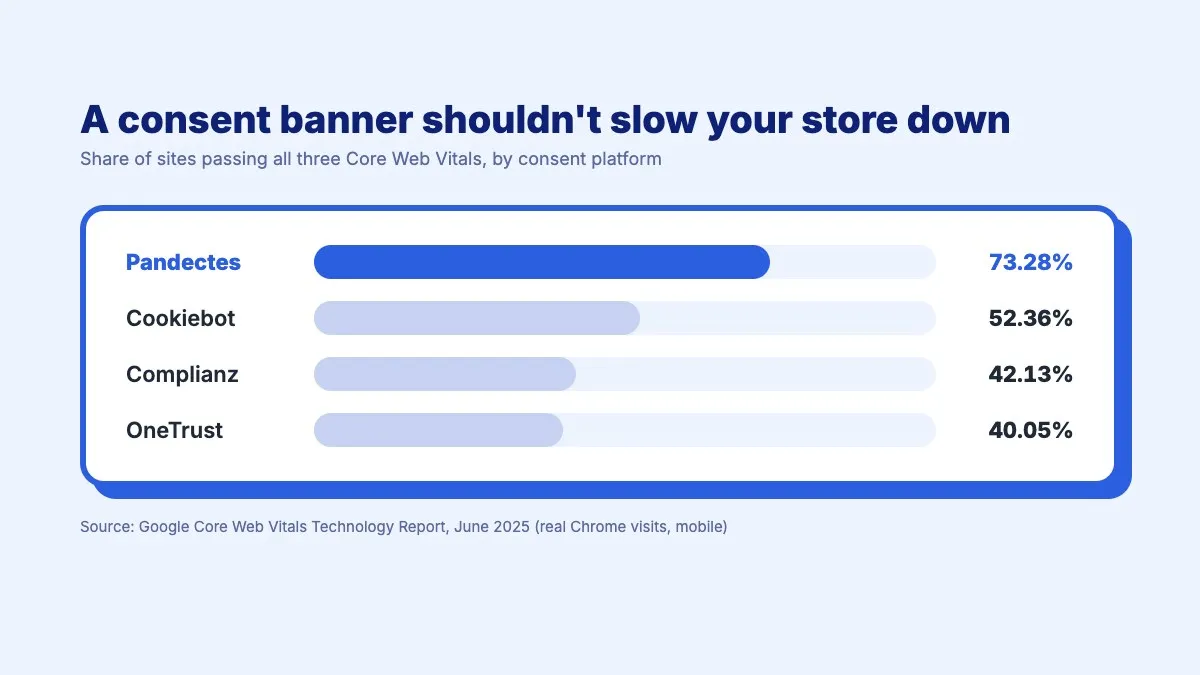 The banner is built on web components, so its styles never leak into your theme, and it loads without blocking the rest of the page.
From gut feeling to testing
The Blend case was possible because the banner could be changed and measured like any other part of the store. Agencies working with Pandectes run these tests today through our API: they set up different banner profiles and compare them over time.
We are now building this into the app itself. Native A/B testing will let merchants create several banner profiles, split traffic between them and pick the winner, without external testing tools and without extra scripts slowing the store down.
Cookie banner design best practices for Shopify
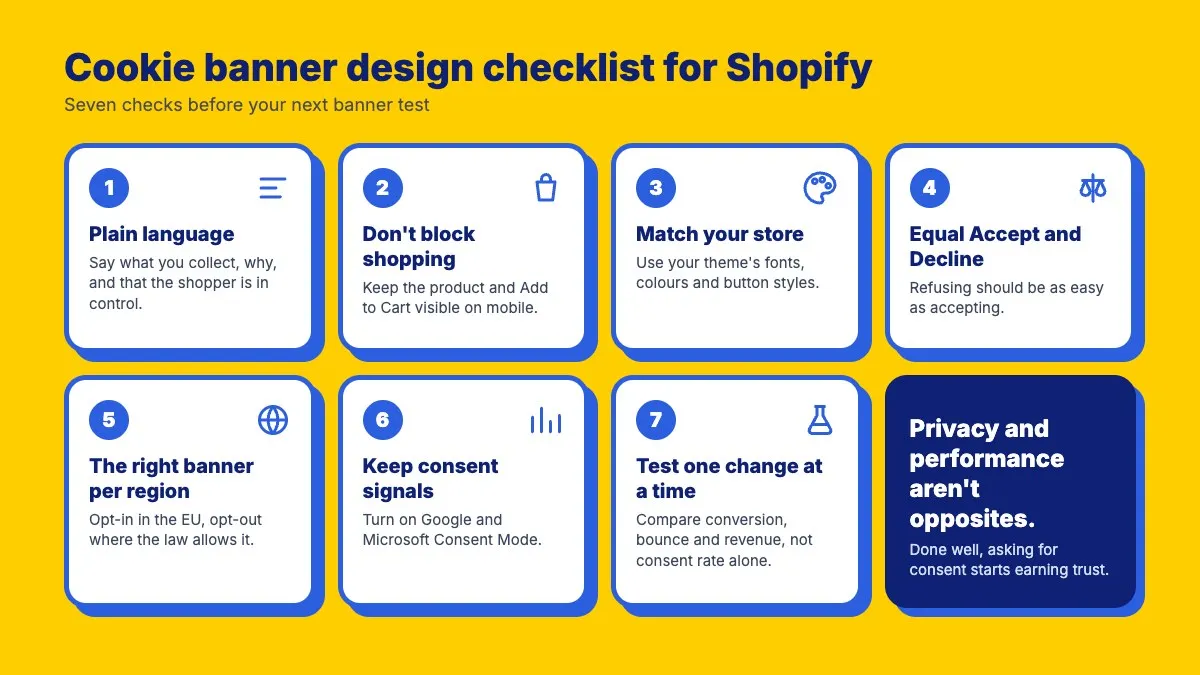
If you want to treat your cookie banner as a conversion lever, start with these questions:
- Is the text in plain language? Say what you collect, why, and that the shopper is in control.
- Does your banner block shopping? Look at your product pages on mobile, where paid traffic lands. If the banner hides the product or the Add to Cart button, that is your first test.
- Does it look like your store? Match the fonts, colours and button styles of your theme.
- Is refusing as easy as accepting? Give Accept and Decline the same weight, and keep the preferences one click away.
- Is it the right banner for each visitor? Use geolocation so shoppers outside the EU are not shown a stricter banner than their law requires.
- Do your ad platforms still get consent signals? Check that Google and Microsoft Consent Mode are on.
- Are you testing? Change one thing at a time, run each version long enough to cover a full sales cycle, and compare conversion rate, bounce rate and revenue per visitor, not consent rate alone.
Privacy and performance are not opposites. Done well, the moment you ask for consent can be the moment you start earning a shopper’s trust.
Make Your Shopify Store GDPR & Cookie Compliant in Minutes
Start Free on ShopifyFrequently asked questions
Why are fewer shoppers accepting cookies?
Shoppers have become warier of how brands use their data. According to Pew Research Center, 67% of Americans say they understand little or nothing about what companies do with their personal data, and Cisco’s 2024 Consumer Privacy Survey found that 75% of consumers won’t buy from organisations they don’t trust with it. Clear, plain-language banners that explain what is collected and why give them a reason to say yes.
Does a cookie banner affect conversion rate?
It can. A banner that blocks the page until the visitor makes a choice adds friction at the moment a shopper is deciding to buy. In an A/B/C test by Blend Commerce on a Shopify store, replacing a blocking banner with a non-blocking one lifted conversion rate by 32% in the UK and by 10.51% in Ireland.
Where should a cookie banner go on a Shopify store?
There is no single best position. In the Blend Commerce test, a banner at the bottom of the page won in the UK and a banner at the top won in Ireland. Keep it clear of the product image and the Add to Cart button, then test positions on your own traffic.
Is a non-blocking cookie banner GDPR compliant?
Yes, as long as no non-essential cookies or tags run before the visitor gives consent, and refusing is as easy as accepting. Pandectes auto-blocking holds marketing and analytics tags back until the visitor agrees, whether or not the banner blocks the page.
What should you A/B test on a cookie banner?
Start with whether the banner blocks the page, then its position, layout and button styling. Measure conversion rate, bounce rate and revenue per visitor alongside the consent rate, and run each version long enough to cover a full sales cycle.