
 Install free
Most stores treat the cookie banner as a box they ticked once. Yet the share of visitors who accept it, your cookie consent rate, quietly decides how much your analytics can see and how well your ad campaigns can learn. A store that spends heavily on landing pages and bidding strategies can lose much of that work to a banner nobody has looked at since it was installed.
This guide explains what a normal consent rate looks like, why it matters more for advertising than for analytics, why tricking visitors into accepting backfires, and six honest ways to raise it.
Key takeaways
- There is no universal benchmark: a good consent rate depends on the visitor’s law, your banner and your audience, so compare each region with itself over time.
- For analytics, a lower consent rate mostly means a smaller sample. For Google Ads and Meta, every conversion you can’t report is one the bidding algorithm never learns from.
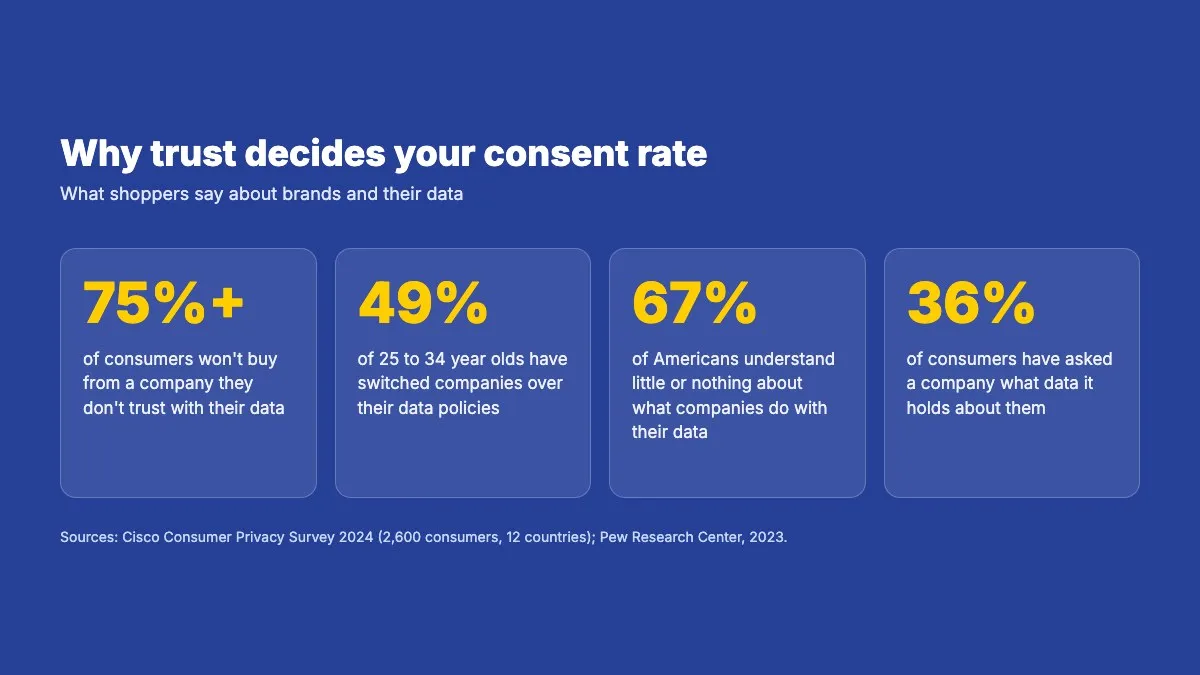
- Dark patterns can raise consent for a while, but they erode trust: more than 75% of consumers won’t buy from a company they don’t trust with their data.
- The banner is the first thing a visitor sees, so treat it like part of your store: plain words, a clear benefit, your own design and the visitor’s language.
- Asking at the moment of need, such as when someone presses play on a video, is compliant and earns more yeses than one big banner on arrival.
- Use the merchant cheat sheet below to check your own banner in five minutes.
What is a good cookie consent rate?
There is no single benchmark, because the rate depends on the law the visitor falls under, the banner’s design and your audience. Research on cookie banners, such as a field experiment by Farronato, Fradkin and Lin across thousands of websites, shows how strongly design shapes the result: many visitors dismiss the banner without choosing at all, and hiding options behind extra clicks pushes people towards whatever is easiest.
So the useful question is not “what is the industry average?” but “is my rate healthy for my store?” Two signs help. A rate that stays low is a sign that something in your banner is putting people off, such as confusing text, a design that looks foreign to your store or the wrong language. And a rate that looks too good is worth a second look: a banner that hides the option to refuse can produce a high number that a regulator would not accept, and that shoppers will eventually resent.
Compare like with like. An opt-in banner for visitors in the EU and UK will always collect fewer yeses than an opt-out notice in a US state, so measure each region on its own. With geolocation, each visitor sees only the banner their own law requires, which on its own stops you asking for more than you need.
Why your consent rate matters more for ads than for analytics
For analytics, a lower consent rate mostly shrinks your sample. Even when only part of your visitors consent, you can still see which pages work and which campaigns bring traffic, because the visitors you can measure behave much like the ones you can’t. Decisions get better with more data, but they don’t collapse without it.
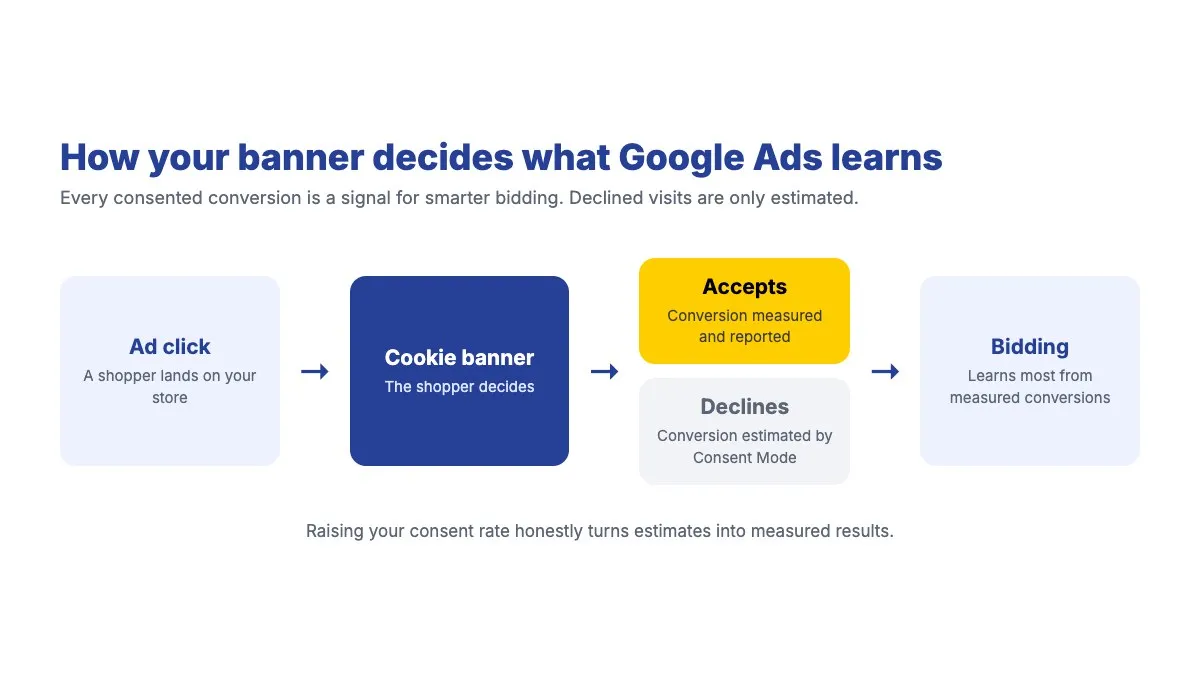
For advertising, the story is different. When a visitor clicks a Google or Meta ad and buys, reporting that conversion back to the platform does two jobs. It tells you which campaign worked, and it trains the bidding algorithm, which uses every reported conversion to decide whom to show your ads to next. A conversion that can’t be reported because the visitor never consented is a signal the algorithm never gets. Fewer signals mean slower learning, weaker targeting and a higher cost for the same results.
That is why advanced setups such as server-side tracking, enhanced conversions or a tag gateway only go so far. They make the signals you have more complete, but the cookie banner still decides how many visitors you can measure in the first place.
Google Consent Mode and Microsoft Consent Mode soften the loss: when visitors decline, the platforms receive cookieless signals and model part of the missing conversions. Modelling helps, but it is an estimate. Every real consent you earn is a measured conversion instead of a modelled one. For how modelling works, see our guide to Google Consent Mode’s behavioural modelling.
Why dark patterns backfire
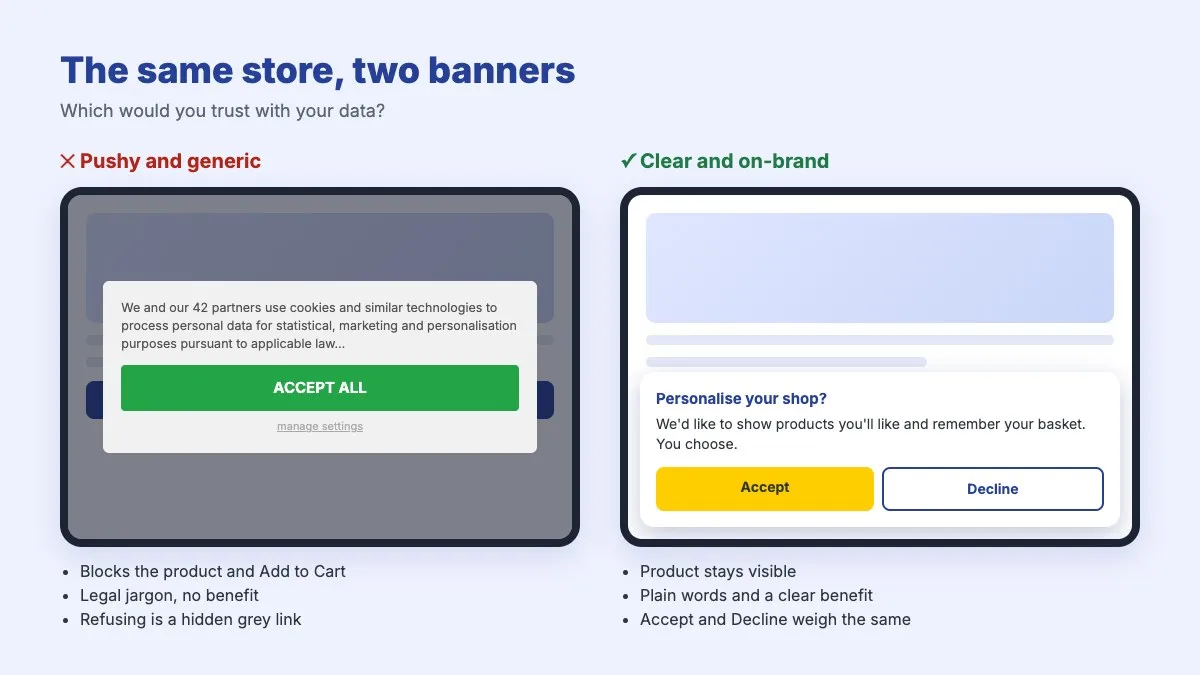
The quickest way to raise a consent rate is to make refusing hard: hide the reject option behind a settings screen, make Accept bright and Decline grey, or pre-tick every category. It works, at first. The NBER study above confirms that burying options behind extra clicks moves people towards the easy choice.
The cost comes later, in three ways.
- Trust. Shoppers notice when they are being steered. According to Cisco’s 2024 Consumer Privacy Survey of 2,600 consumers in 12 countries, more than 75% won’t buy from an organisation they don’t trust with their data, 49% of 25 to 34 year olds have already switched companies or providers over their data policies, and 36% have asked a company what data it holds about them. Shoppers also feel in the dark: 67% of Americans say they understand little or nothing about what companies do with their data, according to the Pew Research Center. A banner that explains itself in plain words speaks straight to that gap.
- Blockers. The more aggressive banners get, the more people install browser extensions that block banners or refuse everything automatically. Once a visitor does that, you lose the chance to ask at all. Browsers are moving the same way: Safari’s Privacy Report already shows visitors how many trackers a site tried to load.
- Regulators. Unequal Accept and Decline buttons are a common target for data protection authorities. France’s CNIL, for example, has fined large websites for making refusal harder than acceptance; see our guide to the CNIL cookie rules.
The trick also fails on its own terms. A banner that pushes consent up with pressure tends to drift down again as visitors learn to distrust it, so the gain is temporary while the damage to your brand is not.
Six ways to raise your consent rate without tricks
Your banner is often the first thing a visitor sees, and on a phone it can cover most of the screen. Many stores polish every pixel of a landing page and leave the banner in its default state. These six changes treat it as part of the store instead.
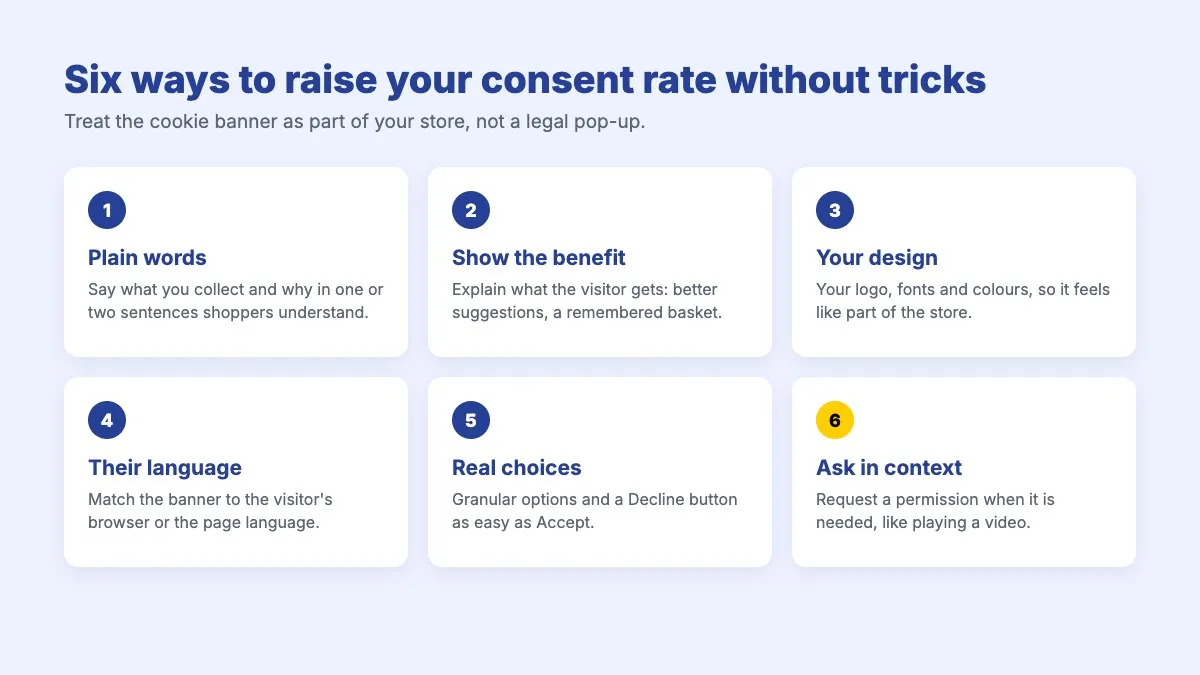
1. Use words your shoppers understand
Your visitors are shoppers, not lawyers or marketers. “We use cookies for statistical and marketing purposes and share data with 40 vendors” tells them little and sounds alarming. Say what you do in one or two plain sentences. The legally required details still belong in the banner, but they can live on the second layer, the preferences screen, where the few visitors who want them will find them.
2. Show what the shopper gets
People accept more readily when they see a benefit. “Allow cookies so we can show you products you’ll like and remember your basket” gives a reason to say yes. “Accept cookies” gives none. Keep the promise honest: describe what the cookies really do for the visitor.
3. Make it look like your store
A banner that looks bolted on reads as a third party, and visitors are warier of third parties. Use your logo, your fonts, your colours and your button styles, so the banner feels like part of the shopping journey. With the Pandectes consent banner, you can match your theme without writing code.
4. Speak the visitor’s language
A banner in a language the visitor can’t read is a banner they won’t accept. If you sell abroad, show the banner in the visitor’s language, matched to the browser or to the language of the page. See languages and translations for how Pandectes handles this, and our guide to the benefits of multilingual cookie banners.
5. Give real, granular choices
The GDPR expects consent to be specific, which means visitors should be able to accept some purposes and not others. It also helps your rate: an all-or-nothing choice pushes undecided visitors towards “nothing”, while separate choices for analytics, marketing and preferences let them say yes to part of it. Make refusing as easy as accepting, with equal buttons on the first layer. Most visitors will never open the preferences screen, so the first layer is where the decision is made.
6. Ask at the moment it makes sense
The banner on arrival does not have to carry every request. Contextual consent, sometimes called just-in-time consent, asks for a specific permission at the moment the visitor wants the thing it unlocks:
- A video placeholder that says “This video is hosted on YouTube. Load it?” when someone presses play.
- A note beside product recommendations: “Allow personalisation to see suggestions based on what you’ve viewed.”
- A map, a chat window or a review widget that asks before it loads.
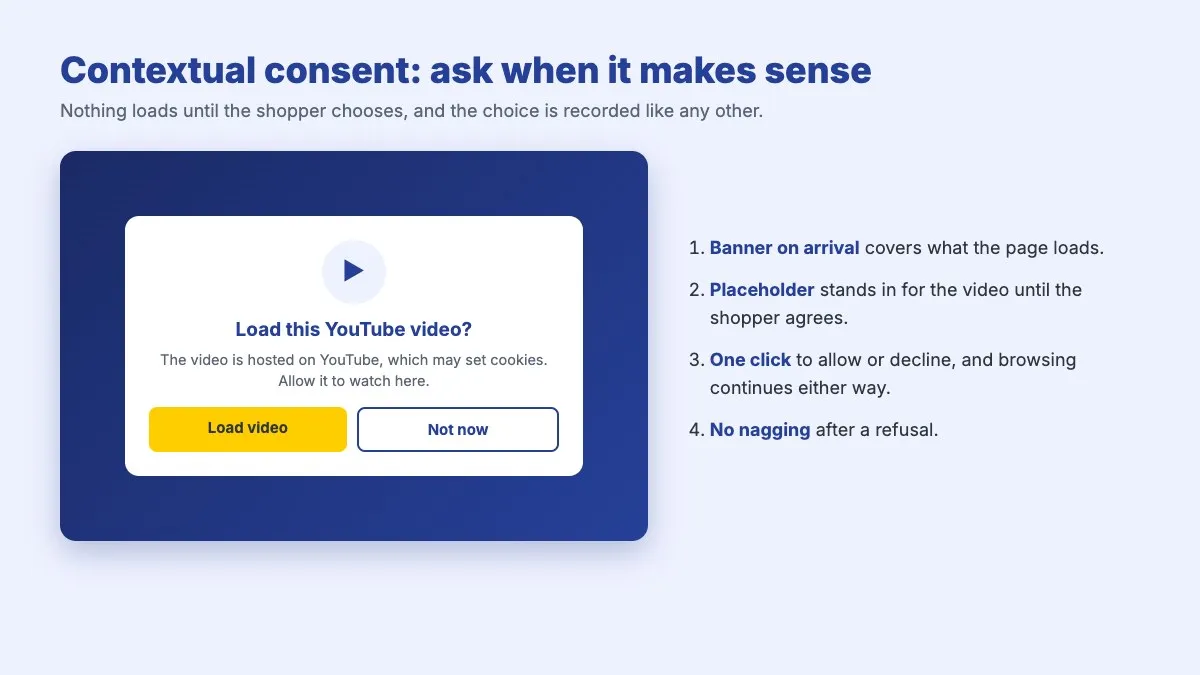
At that moment the visitor understands exactly what they are agreeing to and why, so the request is clearer and more likely to be accepted than a general question on arrival.
 Pandectes GDPR ComplianceThe most popular & reviewed GDPR app for ShopifyInstall free on Shopify
Is contextual consent compliant?
Yes, when it is built properly. Privacy law does not require every consent to be collected the moment a visitor arrives. It requires consent before a non-essential cookie is set or a third-party service loads. Asking at the point of use is often the most specific and best-informed consent a visitor can give. Four conditions keep it safe:
- The banner on arrival stays. It covers everything the page itself loads. Contextual requests are for things needed later, such as videos, maps, chat or personalisation.
- Nothing loads before the visitor agrees. A placeholder stands in for the video or widget until the visitor says yes.
- Declining is as easy as accepting, and the visitor can keep browsing either way. Under Article 7(3) of the GDPR, withdrawing consent must also be as easy as giving it.
- No nagging. A request the visitor triggers, by pressing play for example, is fine. Asking again and again unprompted is not: the CNIL recommends remembering a refusal for a reasonable period so visitors aren’t asked on every visit.
This article explains common practice, not legal advice. Check your setup with your legal advisor if you are unsure.
Building contextual consent with the Pandectes JavaScript API
The Pandectes JavaScript API gives developers and agencies the building blocks for consent requests that fit their store. With it, you can:
- Read the visitor’s consent for analytics, marketing and preferences, so a widget knows whether it may load.
- Set consent from your own interface, so a “Load video” or “Allow personalisation” prompt updates the visitor’s choice in Pandectes, where it is recorded like any other consent.
- Open the preferences dialog from any element, such as a link in your footer or inside a prompt.
- React to consent events, such as the banner becoming ready or the visitor changing their choice, to load a service the moment it is allowed.
Every choice made this way flows into the same consent record and the same Consent Mode signals as the banner itself, so your reporting stays consistent. The full list of functions and events is in the app under Settings > JavaScript API.
The merchant cheat sheet
Print it, share it with your developer or agency, or check your banner against it line by line.
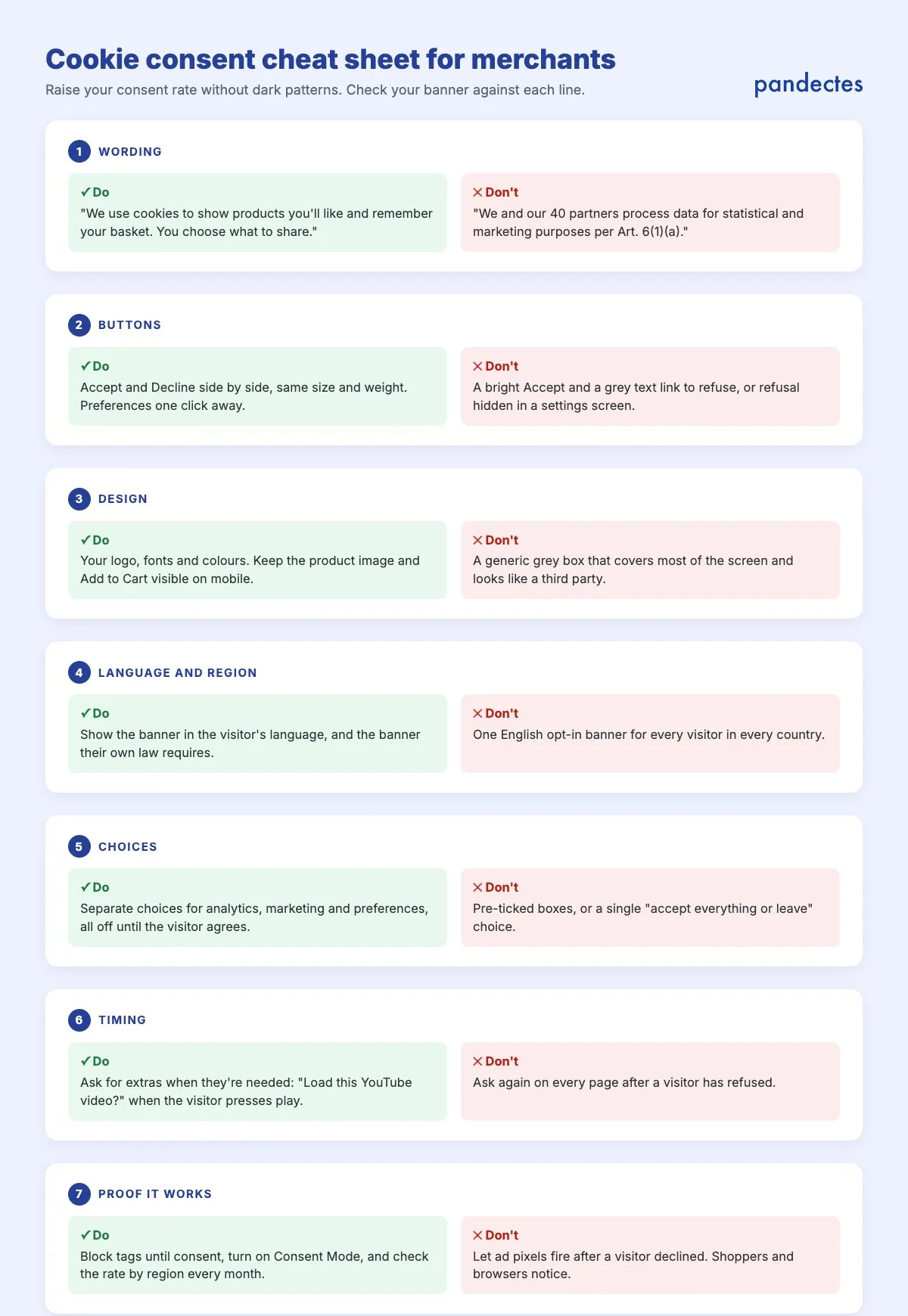
| Area | Do | Don’t |
|---|---|---|
| Wording | One or two plain sentences: what you collect, why, and that the shopper chooses | Legal jargon, vendor counts and article numbers on the first screen |
| Buttons | Accept and Decline side by side, same size and weight | A bright Accept and a grey link to refuse |
| Design | Your logo, fonts and colours; product and Add to Cart still visible on mobile | A generic box that covers most of the screen |
| Language and region | The visitor’s language, and the banner their own law requires | One English opt-in banner for every country |
| Choices | Separate choices for analytics, marketing and preferences, all off until agreed | Pre-ticked boxes or all-or-nothing |
| Timing | Ask for extras when needed, such as playing a video | Asking again on every page after a refusal |
| Proof | Block tags until consent, Consent Mode on, rate checked by region monthly | Ad pixels firing after a visitor declined |
Measure the rate, not just compliance
Consent rate is a number worth watching like conversion rate. Check it by region and by device, change one thing at a time, and give each version long enough to cover a full sales cycle. Judge changes on the consent rate together with conversion rate and revenue per visitor: as our cookie banner design case study showed, the banner that collects the most yeses is not always the one that sells the most.
And make sure the banner does what it says. If a visitor declines marketing cookies and an ad pixel fires anyway, the consent rate is the least of your problems. Auto-blocking holds non-essential tags back until the visitor agrees, and a free store scan shows which cookies your store sets today.
Make Your Shopify Store GDPR & Cookie Compliant in Minutes
Start Free on ShopifyFrequently asked questions
What is a cookie consent rate?
It is the share of visitors who accept cookies when your banner asks them. Most stores track the share who accept all cookies, and some also track partial acceptance, such as visitors who allow analytics but not marketing.
What is a good cookie consent rate?
There is no universal benchmark, because the rate depends on the visitor’s law, the banner’s design and the audience. Compare each region with itself over time, since opt-in banners in the EU and UK collect fewer yeses than opt-out notices in the US. A rate that stays low points to a banner that confuses or puts visitors off; one that looks too good may mean refusing is too hard.
How can I increase my cookie consent rate?
Use plain language, explain the benefit to the visitor, match the banner to your store’s design, show it in the visitor’s language, offer granular choices with an equal option to refuse, and ask for specific permissions at the moment they are needed, such as when a visitor plays a video.
Do dark patterns increase consent rates?
They can raise consent for a while, but they cost trust, push visitors towards banner blockers and attract regulators. More than 75% of consumers won’t buy from an organisation they don’t trust with their data, according to Cisco’s 2024 Consumer Privacy Survey.
What is contextual consent?
Contextual consent, or just-in-time consent, asks for a specific permission at the moment the visitor wants what it unlocks, for example loading a YouTube video when they press play. Nothing loads until the visitor agrees, and declining is as easy as accepting.
Is it compliant to ask for consent when a visitor plays a video?
Yes, as long as the video does not load before the visitor agrees, declining is as easy as accepting, and you don’t ask repeatedly after a refusal. The banner on arrival still covers everything the page loads by itself.
How does consent rate affect Google Ads?
Google Ads uses reported conversions to train its bidding. Conversions from visitors who declined can’t be reported normally, so a lower consent rate means fewer signals for the algorithm. Google Consent Mode models part of the gap, but measured conversions from consenting visitors remain the strongest signal.